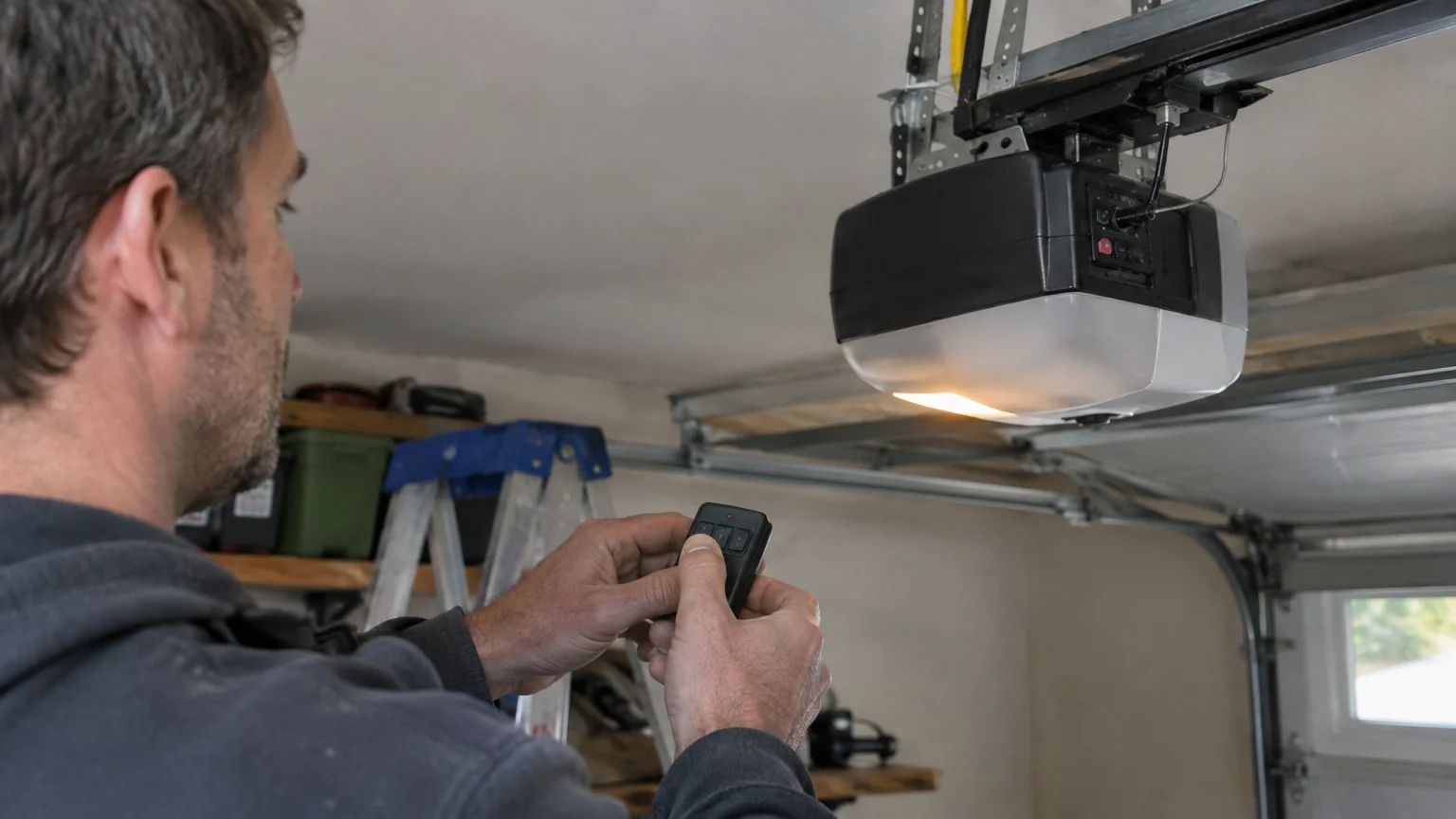
The phrase garage door opener how to program explains how to pair a remote, car button, keypad, or universal control. Most openers use a learn button on the motor unit. The right steps depend on the brand, control type, battery, and vehicle system. Always test the door safely after setup.
Table of Contents
- How does garage door opener programming work?
- How do you program a standard garage door remote?
- How do you program a car’s built-in garage door button?
- How do you program a garage door keypad?
- How do you program a universal garage door remote?
- What should you do when a programmed remote does not work?
- How can you reset garage door remotes and keep the opener secure?
How does garage door opener programming work?
Garage door programming teaches the motor unit to accept a control signal. The opener saves that signal in its memory. When the remote or keypad sends the right code, the opener runs the motor. This helps limit access to people with approved controls.
What the learn or program button does
The learn or program button is often on the opener motor. It may sit near the hanging antenna wire or light cover. Many models have a colored light beside it. Pressing the button starts a short pairing mode. The opener then waits for a remote, keypad, or car button to send a signal.
Light patterns and timing vary by brand and model. Check the owner’s manual before you begin. The manual also lists remotes and keypads that match the opener. Some smart garage door openers use an app instead of, or along with, a remote.
A remote sends a radio signal. A keypad sends a code after you enter it. A car button may learn the remote signal first. It then sends that signal later. These controls do not always pair in the same way.
Which remote, opener, and vehicle controls are compatible
Compatibility depends on the opener brand, model, radio system, and age. A remote that looks right may still use a different signal. A vehicle also needs a built-in system that supports the opener. Your vehicle manual can show whether a separate bridge is needed.
Arroyo Grande Garage Door Repair can help Arroyo Grande property owners choose a control that fits. Local help can save time when the model label is hard to read. It also helps when the manual is missing or several controls have stopped working. The right match reduces failed setup attempts and keeps the door more secure.
How do you program a standard garage door remote?
A standard remote is usually paired with the opener’s learn button. You then press the chosen remote button. You do not need to work on springs, cables, or other loaded parts. Programming is usually safe when you follow the model manual and keep people away from the moving door.
Steps for pairing a remote with the opener
- Find the opener model information. Look for a label on the motor unit, rail, or remote. Write down the brand and model first.
- Check the remote battery. Install the correct battery and make sure it sits firmly. A weak battery can make pairing fail.
- Place the remote near the opener. Keep the door area clear. Children, pets, and vehicles should stay away from the opening.
- Press the learn or program button. Use the manual to confirm the light pattern. Do not press random buttons again and again.
- Press the chosen remote button. Hold it as the manual says. The opener light should confirm that the signal was saved.
- Let pairing mode end. Some systems leave this mode after a short time. If it ends early, follow the model instructions before trying again.
How to confirm the remote works safely
Stand where you can see the whole door. Press the remote once and watch the door start moving. Never stand under the door or drive below it during a test. Press the control again if the manual says it should stop or reverse.
Keep the photo-eye safety sensors clear. These sensors sit near the floor on both sides of the opening. If the door will not close, check for blocked lenses, loose wires, or poor alignment. Never bypass the sensors. Garage Door Opener Repair can help when a remote pairs but the door still moves poorly.
How do you program a car’s built-in garage door button?
A car’s built-in garage door button often needs the original handheld remote. The car first learns the remote signal. The opener may then learn the car button. Your vehicle manual gives the exact button order for that car model.
Why the original remote may be needed
Many vehicle systems copy the signal from a handheld remote. The remote must usually sit close to the car buttons during setup. A working battery matters because the car cannot learn a weak signal well.
Some newer cars use another system. They may connect through a built-in compatibility method or need a separate bridge. A dealer, opener maker, or trained garage door worker can confirm the correct setup. Guessing may erase a working control or confuse the pairing process.
How to pair the vehicle buttons with the opener
Park the vehicle outside the door’s path. Keep the engine off unless the vehicle manual says otherwise. Follow the car instructions to train the chosen button with the handheld remote. The indicator light often changes when the car learns the signal.
Next, use the opener’s learn button if direct pairing is needed. Press the car button as the opener manual directs. Test it while the door is fully visible. The button should start or stop the opener without delay. The safety sensors must still work normally.
A failed setup may come from a weak remote battery, an unsupported opener, or a car memory problem. A smart opener may also need account access or app setup. Garage Door Opener Repair can help when a car button works only sometimes, loses its pairing, or operates the wrong door.
How do you program a garage door keypad?
A garage door keypad is set up by placing the opener in learn mode. You then create a personal entry code. The code should be easy for your household to remember but hard for others to guess. Test the keypad while the door area is clear.
Setting or changing a keypad code
Read the keypad and opener manuals first. Older keypads may use switches. Newer models may use a learn button and code sequence. The steps are not the same for every model, so the model number matters.
Choose a code that does not use an address, phone number, birth date, or public detail. Enter it only when the keypad is ready. If the light does not respond as expected, stop and check the manual. Do not press many combinations at random.
A code change may remove an old code or add a new one. Find out which result applies before starting. If a past resident, tenant, worker, or family member still knows the code, changing it is a sensible security step.
Testing the keypad and securing access
Test the keypad from a safe place with the whole door in view. Enter the code and use the open or enter button as directed. Confirm that the door starts moving. Then test closing with no person, pet, or object underneath.
Keep the keypad cover closed when it is not in use. Wipe dirt and moisture away with a soft, dry cloth. Do not spray cleaner into the buttons. If the keypad works only nearby, check its battery before assuming the code is wrong.
A keypad that opens the door without the right code needs quick attention. The code may not have saved, or the keypad may have a fault. A technician can check the control, opener memory, wiring, and security settings without touching spring or cable parts.
How do you program a universal garage door remote?
A universal garage door remote works with some opener brands and models. It does not work with every system. Check the package or manual for supported openers before trying to pair it.
Checking compatibility before programming
Find the opener brand and model on the motor unit. Compare it with the universal remote’s compatibility list. The opener’s age, radio system, security type, and learn-button color may affect the match. A remote from the same brand may still use a different security system.
Use a new or known working battery in the remote. Follow the remote manual when removing old batteries. Keep the remote away from other controls during setup. This makes it easier to tell which signal the opener saved.
One universal remote may control more than one door. Pair each button with the correct opener. Labeling the buttons can prevent mistakes in a shared garage or small business.
Common pairing methods for universal remotes
Many universal remotes use a learn-button method like the original remote. Others use a brand code, switch setting, or both. The remote manual should explain the method for your opener.
After pairing, test the remote from safe places. The door should respond in a steady way. A short range, delayed response, or second door moving may point to interference, a poor match, or a memory issue.
Do not open the motor housing or change wiring to make the remote work. Those actions can create shock, control, and security risks. If the remote is listed as compatible but fails, Garage Door Opener Repair can test it with the opener. Arroyo Grande Garage Door Repair helps property owners and nearby communities choose and set up opener controls.
What should you do when a programmed remote does not work?
Start with simple checks before assuming the opener needs a major repair. A dead battery, blocked sensor, locked wall control, or weak signal can stop a programmed remote. If the door is heavy, crooked, noisy, or stuck, the problem may be in the door hardware instead.
Battery, range, and signal troubleshooting
Replace the remote battery with the correct type. Check for corrosion, a bent contact, or a loose battery cover. Try the wall control if it is safe. If the wall control works but the remote does not, focus on the remote, pairing, or signal range.
Make sure the opener has power. Check whether the motor light turns on and whether other controls respond. Keep the remote away from metal objects and thick walls while testing. A keypad may need a fresh battery and clean buttons.
Look at the photo-eye sensors near the floor. Both lights should show normal alignment according to the opener manual. Clear leaves, boxes, and cobwebs from the sensor area. Never move, cover, or bypass the sensors to force the door closed.
When the opener, remote, or wiring may need repair
A remote may pair but still fail because the opener receiver is damaged. Loose low-voltage wires, a failed wall control, worn gears, or a control board fault can also stop normal use. A door that hums, reverses, lifts unevenly, or will not move needs more than programming.
Do not adjust springs, lift cables, or bottom brackets during remote troubleshooting. These parts can hold strong force and cause severe injury. A trained professional uses the right tools and checks the door balance before touching loaded parts.
Garage Door Opener Repair is a good option when basic checks do not solve the problem. If the door is off track, damaged, or unsafe, another repair may be needed. Arroyo Grande Garage Door Repair can help find whether the fault is in the control, opener, wiring, or door.
How can you reset garage door remotes and keep the opener secure?
Resetting an opener can remove stored remotes, keypads, and car controls. It can help after a lost remote, a change in occupants, or a security concern. The reset method differs by model, so confirm the result before starting.
When to erase old remotes and codes
Erase old controls when a remote is lost or someone who should not have access knows the keypad code. A reset may remove every stored control instead of one device. Gather current remotes first and plan to pair them again afterward.
After a reset, test each approved remote, car button, and keypad. Remove unknown controls from your household list. Keep spare remotes in a safe place. For smart openers, review user accounts, shared access, and app permissions.
Good upkeep also helps. Replace weak batteries, clean sensor lenses, and watch for changes in range or response. A door that needs repeated commands may have an opener or wiring problem. Routine Garage Door Maintenance can help find issues before the door becomes hard to secure.
When professional garage door opener help is safer
Professional help is safer when the opener has no power, the door is stuck, the rail is damaged, or wiring looks loose. It is also needed when springs, cables, or bottom brackets may be involved. These parts are under force and should not be adjusted through a home how-to guide.
A qualified technician can match a remote, check the receiver, inspect the safety sensors, and test the door. The final cost is confirmed on a quote after the needed work and parts are clear. Opener repair is often a smaller job than full door replacement, but damage, access, and urgency affect the work.
Frequently Asked Questions
Can a homeowner program a garage door remote without professional help?
Yes, many homeowners can pair a compatible remote by following the opener manual. Battery checks, sensor cleaning, and simple programming are usually safe. Professional help is needed for wiring faults, unsafe doors, or springs, cables, and brackets.
Why does the remote light work but the garage door stay closed?
The remote light only shows that its button has power. It does not prove that the signal reaches the opener. Check pairing, opener power, sensors, locks, and the wall control. A heavy or stuck door needs a professional check.
How do you program a garage door opener with a universal remote?
First, confirm that the universal remote supports the opener model. Then follow its method, which may use a learn button or brand code. Test one button at a time. If pairing fails, the remote, receiver, or opener memory may need testing.
Can a keypad and remote use the same garage door opener?
Yes, many openers can store several approved controls. The keypad and remote usually use separate setup steps, but both work with the same motor unit. Keep each code and control secure. If one control opens the wrong door, erase stored settings and pair each device again.
When should someone call for garage door opener help?
Call for help when the door is stuck, off track, noisy, uneven, or unsafe. Professional service is also wise when wiring, the receiver, springs, cables, or bottom brackets may be involved. Do not bypass safety sensors or adjust loaded hardware.
Key takeaways
- Use the opener manual because steps differ by model and control type.
- Check batteries, power, sensors, and compatibility before repeating setup attempts.
- Test every control safely with the door visible and the path clear.
- Reset lost remotes and old keypad codes to protect home or business access.
- Leave springs, cables, brackets, and unsafe doors to trained professionals.
A working remote is only one part of safe garage access. The opener, sensors, door hardware, and security settings must work together. Property owners in Arroyo Grande can review these checks before requesting help. Contact us today for urgent garage door opener help from Arroyo Grande Garage Door Repair.